
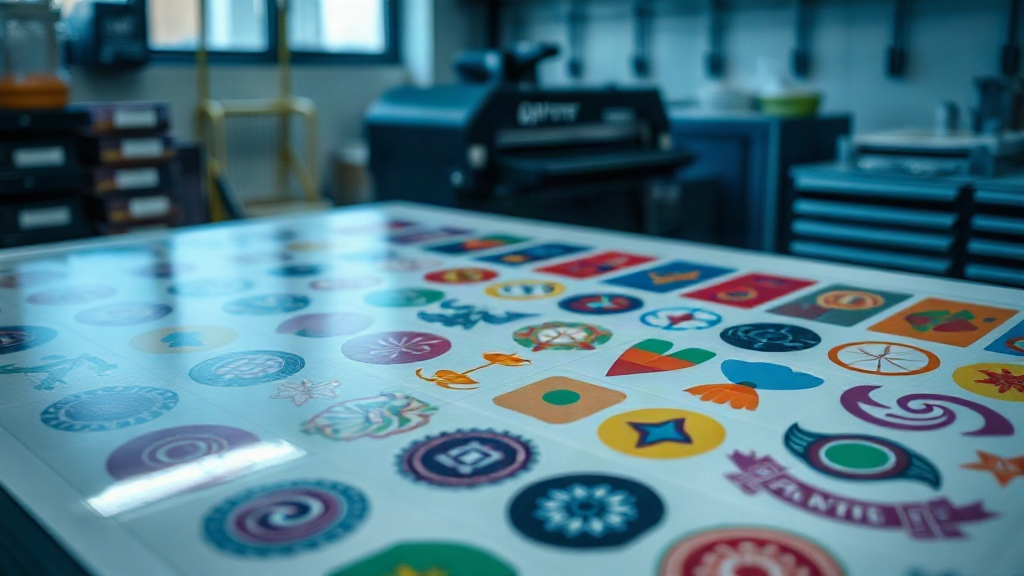
If you're into DTF printing, you've probably heard about gangsheets. But what exactly are they, and why should you care? In short, a DTF gangsheet is a single sheet containing multiple designs arranged efficiently to maximize space and minimize waste. It's a game-changer for small business owners and hobbyists alike, allowing you to print multiple transfers in one go. Whether you're running a print-on-demand shop or just love creating custom apparel, mastering the DTF gangsheet can significantly boost your efficiency and bottom line.
In this guide, we'll dive deep into everything you need to know about DTF gangsheets. From the basics of DTF printing to advanced tips for optimizing your gangsheet layouts, we've got you covered. By the end, you'll be ready to create your own gangsheets like a pro.
What is DTF Printing?
Before we jump into gangsheets, let's quickly recap DTF printing. DTF stands for Direct to Film. It's a printing method where your design is printed onto a special film, coated with adhesive powder, and then heat-pressed onto fabric. Unlike DTG (Direct to Garment) or screen printing, DTF works on almost any fabric, including cotton, polyester, blends, and even dark colors. It's versatile, durable, and produces vibrant colors.
The process involves several steps: designing, printing, powdering, curing, and pressing. Each step requires attention to detail, but the results are worth it. DTF printing has become increasingly popular due to its low setup costs and high-quality output.
What is a DTF Gangsheet?
A DTF gangsheet is essentially a large sheet of film that contains multiple designs printed together. Instead of printing one design at a time, you arrange several designs on a single sheet, optimizing the use of space. This is similar to gang printing in offset printing, where multiple jobs are combined on one sheet to save time and materials.
Gangsheets are typically created using specialized software or plugins that allow you to import your designs and automatically arrange them to fit within the sheet dimensions. The goal is to minimize wasted film and maximize the number of transfers per sheet. This not only reduces your cost per transfer but also speeds up production, especially when you have many small designs.
Why Use a DTF Gangsheet?
There are several compelling reasons to incorporate DTF gangsheets into your workflow:
- Cost Efficiency: By maximizing the use of film, you reduce waste and lower your cost per transfer. Film and powder are significant expenses in DTF printing, so every inch saved adds up.
- Time Savings: Printing multiple designs at once means fewer print jobs, less machine time, and faster overall production. You can prepare a gangsheet with dozens of designs and print them all in one go.
- Consistency: When you print multiple designs on the same sheet, they undergo the same conditions (temperature, pressure, etc.), ensuring consistent quality across all transfers.
- Organization: Gangsheets keep your designs organized. You can group designs by order, customer, or theme, making it easier to track and fulfill orders.
Whether you're a small business or a large operation, gangsheets can streamline your DTF printing process.
How to Create a DTF Gangsheet
Creating a gangsheet might seem daunting at first, but with the right tools and approach, it becomes second nature. Here's a step-by-step guide.
Step 1: Choose the Right Software
You'll need software that supports gangsheet creation. Popular options include:
- Adobe Photoshop: With its powerful layering and canvas tools, you can manually arrange designs. However, it lacks automation, so it's time-consuming for large sheets.
- Illustrator: Similar to Photoshop, but vector-based. Good for precise placement.
- Dedicated DTF RIP Software: Programs like Cadlink, AcroRIP, or DTF-specific plugins (e.g., for Epson or Ricoh printers) offer gangsheet features. They often include nesting algorithms to automatically arrange designs.
- Online Gangsheet Builders: Some websites provide free or paid tools where you upload designs and they generate a gangsheet for you. These are great for beginners.
For best results, invest in dedicated DTF RIP software. It will save you hours of manual work and optimize film usage.
Step 2: Prepare Your Designs
Before creating a gangsheet, ensure each design is print-ready. That means:
- Correct Size: Know the dimensions you need for each design. If you're printing for apparel, sizes like 10x10 inches or 12x12 inches are common. But you can have smaller designs for pocket prints or larger for back prints.
- Transparent Background: Save designs as PNG with transparent background. This allows them to be placed on the film without unwanted white boxes.
- High Resolution: 300 DPI is standard for DTF printing. Low-res images will look pixelated.
- Color Mode: Use CMYK for printing, but DTF printers often use RGB. Check your printer's requirements. Most DTF printers use CMYK plus white ink.
- Mirroring: Remember to mirror your designs horizontally because the film is pressed face-down onto the fabric. Your software might handle this automatically.
Organize your designs in a folder and label them clearly.
Step 3: Set Up Your Gangsheet Canvas
Open your software and create a new document with the dimensions of your film. Common film widths are 13 inches, 17 inches, or 24 inches, and you can have lengths up to several feet (e.g., 12 inches by 60 inches). The size depends on your printer's capabilities.
Set the resolution to 300 DPI and the color mode to RGB (or as required). If your software supports it, enable the gangsheet or nesting feature.
Step 4: Import and Arrange Designs
Import your designs onto the canvas. If you're using nesting software, it will automatically arrange them to minimize gaps. If not, manually drag and drop designs, rotating them as needed to fit snugly. Leave a small margin (about 0.25 inches) between designs for easy cutting.
Consider the following tips for efficient arrangement:
- Group Similar Sizes: Place designs of similar heights together to create rows.
- Rotate Designs: Sometimes rotating a design 90 degrees can fill a gap better.
- Use Every Inch: Don't leave large empty areas. Fill them with small designs like logos or tags.
- Mind the White Ink: If your printer uses white ink, ensure that white areas are properly supported. Some software automatically generates white underbase.
Once arranged, double-check that no designs overlap and that there's enough space for cutting.
Step 5: Print and Process
Send the gangsheet to your DTF printer. Ensure the film is loaded correctly and the printer settings are optimal (e.g., ink density, white ink layers). After printing, apply adhesive powder evenly, shake off excess, and cure the film in an oven or with a heat gun. Finally, press the transfers onto your garments.
For a detailed walkthrough of the DTF process, check out our other guides.
Tips for Optimizing Your DTF Gangsheets
Creating a gangsheet is one thing; optimizing it is another. Here are some pro tips to get the most out of your gangsheets.
1. Plan Ahead
Before you start arranging, know what designs you need and their quantities. If you have multiple orders, group them logically. For example, if you have 10 orders each with a small logo, you can fit many on one sheet.
2. Use Nesting Software
Manual arrangement can lead to wasted space. Nesting software uses algorithms to pack designs tightly, often saving 10-20% more space than manual methods. If you do a lot of gangsheets, this investment pays off quickly.
3. Standardize Design Sizes
If possible, standardize the sizes of your designs. For example, offer three sizes: small (3x3), medium (8x8), and large (12x12). This makes arranging easier and more predictable.
4. Keep a Library of Common Designs
If you frequently print certain designs (e.g., your brand logo), keep them handy and reuse them in gangsheets. You can fill gaps with these evergreen designs.
5. Test Your Layout
Before printing a full sheet, do a test print on plain paper to check the arrangement and sizes. This can catch mistakes before wasting expensive film and ink.
6. Maintain Your Printer
A well-maintained printer produces consistent results. Regularly clean the printhead, check ink levels, and follow the manufacturer's maintenance schedule. A clogged nozzle can ruin an entire gangsheet.
7. Consider Film and Powder Quality
Not all films and powders are created equal. Cheaper alternatives may save money upfront but can cause issues like poor adhesion, cracking, or dull colors. Invest in quality supplies from reputable brands.
Common Mistakes to Avoid
Even experienced printers make mistakes. Here are some common pitfalls and how to avoid them.
- Overcrowding: Trying to fit too many designs can lead to overlapping or insufficient space for cutting. Leave adequate gaps.
- Forgetting to Mirror: If you forget to mirror your designs, the final transfer will be backwards. Double-check before printing.
- Inconsistent White Ink: White ink is crucial for vibrant colors on dark fabrics. Ensure your white layer is thick enough but not too thick, which can cause stiffness.
- Poor Powder Application: Too much powder leads to a rough feel; too little causes poor adhesion. Aim for an even, thin coating.
- Skipping Curing: Uncured powder will not adhere properly. Always cure according to the powder manufacturer's instructions.
- Using Low-Resolution Images: Pixelated prints look unprofessional. Always use high-res images.
Avoiding these mistakes will save you time, money, and frustration.
Frequently Asked Questions
What is the maximum size for a DTF gangsheet?
The maximum size depends on your printer's capabilities. Common film widths are 13, 17, and 24 inches, with lengths up to several feet. Some industrial printers can handle wider films. Check your printer's specifications.
Can I use any DTF printer for gangsheets?
Yes, any DTF printer can print gangsheets as long as you can arrange multiple designs on one sheet. However, having RIP software with nesting features makes the process much easier.
How do I calculate the cost per transfer on a gangsheet?
To calculate cost per transfer, add up the costs of film, ink, powder, and labor, then divide by the number of transfers on the sheet. Gangsheets reduce film and ink waste, lowering the cost per transfer.
Do I need special film for gangsheets?
No, you can use standard DTF film. However, some films are designed for better ink absorption or easier peeling. Experiment to find what works best for your setup.
How do I store gangsheets before pressing?
Store printed and powdered gangsheets in a cool, dry place away from direct sunlight. Place them between sheets of parchment paper to prevent sticking. They can be stored for several weeks if kept clean and dry.
Conclusion
Mastering the DTF gangsheet is a skill that can elevate your DTF printing business. By optimizing your layouts, you save time, reduce costs, and increase output. Remember to invest in good software, prepare your designs properly, and avoid common mistakes. With practice, you'll be creating efficient gangsheets effortlessly.
At DTF Crafters, we're dedicated to helping you succeed in DTF printing. Explore our resources for more tips and tricks. Happy printing!