
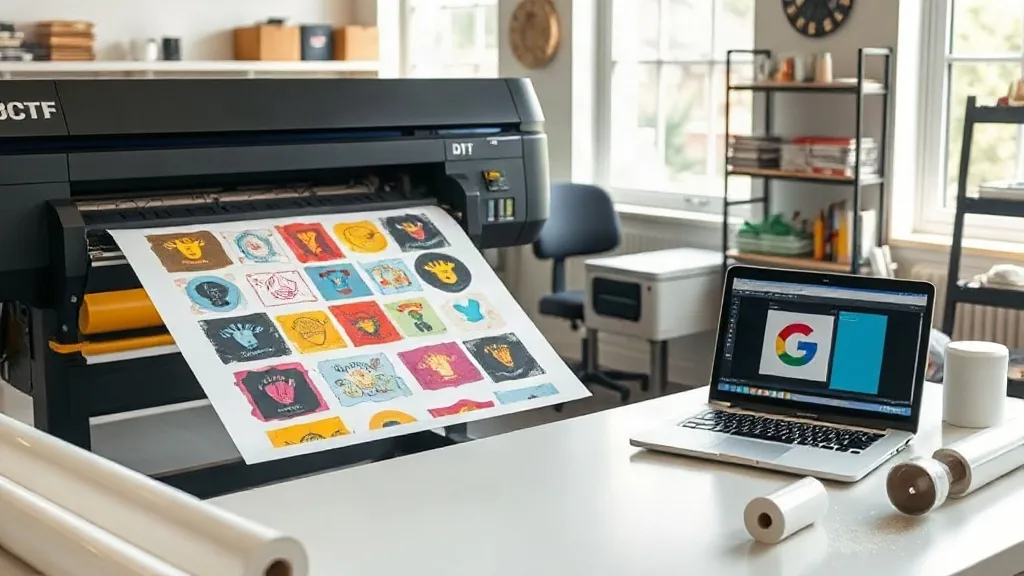
If you run a small print shop or an online apparel brand, you already know that time and material costs can eat into your margins. What if you could produce multiple designs in one print run, cut down on waste, and still deliver vibrant, long-lasting transfers? That's exactly what a DTF Gangsheet offers. In this guide, we'll explore how gangsheets work, why they're a game-changer for small businesses, and how to make the most of every sheet.
What Exactly Is a DTF Gangsheet?
A DTF gangsheet is a single sheet of transfer film that contains multiple designs arranged together. Instead of printing each design individually, you gang them up on one large sheet, send it through the printer once, and then cut out each transfer as needed. This approach is similar to gang printing in offset lithography, where multiple jobs are combined on one press sheet to save time and money. With DTF (Direct to Film) printing, the gangsheet method brings those same efficiencies to custom apparel decoration.
The process involves printing your designs onto a special film using DTF inks, applying a powder adhesive, and then curing the sheet. The result is a flexible, stretchable transfer that can be applied to a wide range of fabrics, including cotton, polyester, blends, and even some nylons. Because the designs are grouped, you can mix and match sizes, colors, and even different graphics on a single sheet.
Why Gangsheets Make Sense for Small Businesses
For startups and small shops, every dollar counts. Gangsheets offer several advantages that directly impact your bottom line.
Cost Efficiency
Printing a gangsheet reduces the cost per transfer. You're using one sheet of film, one run through the printer, and one pass through the powder shaker. The savings in materials and labor add up quickly, especially when you're producing multiple items for a single order or event.
Time Savings
Instead of loading and unloading the printer for each design, you prepare one file with all your designs and print them in one go. This streamlines your workflow and frees up time for other tasks, like marketing or customer service.
Versatility
Gangsheets are perfect for variety packs, sample sets, or orders with multiple sizes and designs. You can include small logos, large back prints, and even sleeve designs all on one sheet. This flexibility is ideal for sports teams, corporate events, or family reunions where everyone wants something slightly different.
How to Create an Effective DTF Gangsheet
Creating a gangsheet that maximizes efficiency requires some planning. Here are the key steps and tips to get it right.
1. Plan Your Layout
Start by determining the size of your sheet. Common sizes are 13x19 inches, 22x24 inches, and 24x36 inches, but you can choose based on your printer's capabilities. Arrange your designs to minimize empty space. Nest smaller designs around larger ones, and rotate designs if necessary to fit more on the sheet. Remember to leave a small gap between designs (about 0.25 inches) to make cutting easier.
2. Use Design Software
Programs like Adobe Illustrator, CorelDRAW, or specialized RIP software can help you arrange your designs precisely. Many DTF printers come with their own layout software that automates nesting. Whichever tool you use, ensure your designs are properly sized and mirrored if required (some DTF processes require mirroring).
3. Consider the Fabric and Application
Different fabrics may require slightly different transfer settings, but the gangsheet itself is universal. Just make sure your designs are appropriate for the intended fabric. For example, stretchy fabrics benefit from designs with some flexibility, which DTF transfers naturally provide.
4. Print, Powder, and Cure
Once your gangsheet is laid out, print it using your DTF printer. While the ink is still wet, apply the adhesive powder evenly, shake off excess, and cure the sheet according to your powder's instructions (usually in an oven or with a heat press). Proper curing ensures the transfer will withstand washing and stretching.
Maximizing Your Gangsheet: Pro Tips
To get the most out of every sheet, keep these practical tips in mind.
- Group similar colors: If your printer uses white ink, grouping designs with similar color profiles can reduce ink changes and improve efficiency.
- Use test prints: Before committing to a full sheet, print a small test to check color accuracy and adhesion.
- Keep a library of layouts: Save your gangsheet layouts for recurring orders to save time in the future.
- Mind the margins: Leave a border around the edge of the sheet to prevent ink from spilling over and causing jams.
- Label your transfers: After cutting, label each transfer with its design name and size to avoid mix-ups during application.
Common Mistakes to Avoid
Even experienced printers can slip up. Watch out for these pitfalls.
Overcrowding the Sheet
While it's tempting to squeeze every inch, overcrowding can lead to cutting errors and ink smudging. Leave enough space for clean cuts.
Ignoring Grain Direction
Some fabrics have a grain, and designs should align accordingly. While DTF transfers are versatile, considering grain can improve the final look.
Improper Curing
Under-cured transfers may crack or wash out prematurely. Always follow the powder manufacturer's curing guidelines and use a heat gun or oven thermometer to verify temperatures.
Real-World Applications
Gangsheets shine in scenarios where variety is key. Here are a few examples:
- Sports teams: Print jersey numbers, names, and logos for an entire team on one sheet.
- Event merchandise: Create a batch of transfers with event logos in different sizes for t-shirts, hoodies, and bags.
- Sample packs: Offer customers a sample pack of your designs without breaking the bank.
- Seasonal collections: Produce a limited run of holiday designs efficiently.
Frequently Asked Questions
What is the maximum size for a DTF gangsheet?
The maximum size depends on your printer. Common sizes range from 13x19 inches up to 24x36 inches or larger for industrial printers. Check your printer's specifications.
Can I mix different fabric types on one gangsheet?
Yes, the gangsheet itself is printed on film and can be applied to various fabrics. However, ensure that the designs are suitable for the intended fabric and that you use the correct application settings for each fabric type.
How do I store unused transfers from a gangsheet?
Store them in a cool, dry place away from direct sunlight. Keep them flat or rolled loosely to prevent creasing. Properly stored transfers can last for several months.
Is a DTF gangsheet cost-effective for small orders?
Absolutely. Even for small orders, gangsheets reduce waste and labor. You can combine multiple small orders on one sheet to maximize savings.
Do I need special software to create a gangsheet?
While specialized RIP software can automate nesting, you can create a gangsheet using standard design software like Illustrator or CorelDRAW. The key is to arrange designs efficiently and save as a single file for printing.
Ready to give gangsheets a try? Start by planning a simple layout with a few designs, and see how much time and material you save. With practice, you'll wonder how you ever managed without them.